Formatting Output
Example Code
Examples for this module can be found on GitHub.
Modules
Section titled “Modules”In the previous modules, you used a number of Python modules. Some have been from the Python standard library while others were from 3rd party packages installed with pip. But you can also make your own modules. You actually already have, possibly without realizing it!
Every time you make a Python file, that file can be treated like a module. All you have to do is import a module of the same name as the file, without the extension. Let’s take a closer look.
The code to access the current prices with CoinGecko has no dependencies on the rest of the application code. Therefore that code, along with its own dependencies, can be moved to a different file and thus a different module. Call it coingecko.py
import os
import requestsfrom dotenv import load_dotenv
load_dotenv()

def get_current_price(coins, currency="usd"):    coingecko_api_key = os.getenv("COINGECKO_API_KEY")    coin_ids = ",".join(coins)    response = requests.get(        f"https://api.coingecko.com/api/v3/simple/price?vs_currencies={currency}&ids={coin_ids}&x_cg_demo_api_key={coingecko_api_key}"    )    return response.json()
This will raise errors in the main file, manager.py because the get_current_price function is called but no definition can be found. To solve this, import the get_current_price function from the coingecko module.
from coingecko import get_current_priceYou can do the same thing with the database code. Move it into a file called db.py.
import datetime
from peewee import (    BooleanField,    DateField,    SqliteDatabase,    Model,    CharField,    FloatField,    TextField,)
db = SqliteDatabase("portfolio.db")

class CryptoTransaction(Model):    coin = CharField()    amount = FloatField()    buy = BooleanField(default=True)    timestamp = DateField(default=datetime.date.today)    notes = TextField(null=True)
    class Meta:        database = db

db.connect()db.create_tables([CryptoTransaction])
And in manaager.py import the CryptoTransaction class from the db module.
from db import CryptoTransactionA word should be said about organization. As an application grows, so will the number of modules used. The Python interpreter does not care about the order of the modules. It only cares that they are imported. However, for those who might see your code in the future - including yourself - there is a consensus from the PEP-8 style on how to organize module imports in a Python application.
Think of modules in three categories:
- Python standard libary (ie.
datetime) - Installed 3rd party modules (ie.
requests) - Modules you created (ie.
coingecko)
The imports should be arranged in that order: Python standard library first, then 3rd party modules and finally those you created for the application. In addition generic module imports such as import Typer should be included before more specific imports. The imports for manager.py would like like this:
import typer
from collections import Counterfrom rich import printfrom typing import Annotated
from db import CryptoTransactionfrom coingecko import get_current_price
There are no imports from the Python standard library after separating the code into modules. If there were it would come before the import Typer line.
In addition to organizing the module imports, PEP-8 also recommends all imports be placed at the top of the top of the file.
Formatting with rich
Section titled “Formatting with rich”A common issue with CLI applications is the output can be … boring. The lack of style and formatting can also make it difficult to read and visually parse the output. By applying colors and using ASCII characters to create “widgets” applications become much easier to use and understand. Python apps can leverage the rich package to do all of this and more.
First install the rich package.
$ pip install richThe simplest way to format text using rich is the print function.
from rich import printNote
This will clobber the built-in Python
richrichfunction supports the therichconsole markup as you’ll see next. You can alias therichfunction if you really want to keep the two separate.
Console markup
Section titled “Console markup”To add color and style to your CLI application output the print function can render console markup. This is similar to HTML tags except with square brackets instead of angles. The following code will render the the coin name as blue in the output.
print( f"Added transaction: [blue]{'Bought' if not sell else 'Sold'}[/blue] {amount} {coin.capitalize()}")You can also add style. Let’s make the price of the coin bold green.
print( f"Added transaction: [blue]{'Bought' if not sell else 'Sold'}[/blue] [bold green]{amount}[/bold green] {coin.capitalize()}")If we replace the last line of the add_transaction function with the above code, the output of the command
python manager.py add bitcoin 0.5Will look like this:

You can omit the closing tag and the style will be applied to the rest of the string. You can also use a single slash to close the tag like this [blue]blue text[/] other color text
Note
The order of the color and styles is irrevelant. Instead of
[bold green]you could have used[green bold]. If you include a closing tag, the order of the colors and styles must be the same in both the opening and closing tags.
Constructing formatted text
Section titled “Constructing formatted text”It might not always be convenient to include all markup and content in a string all at once. There are times, especially in larger applications where it makes more sense to construct a formatted string in stages depending on the state of the application. This is where the Text class from the rich.text module comes in. Used in conjunction with the Console class from the rich.console module, you can programmatically construct and render formatted text.
First import the required classes:
from rich.console import Consolefrom rich.text import TextLet’s add a new command to the manager.py file to lookup the current price of a coin optionally in a specific currency.
@app.command("lookup")def lookup_price( coin: str, currency: Annotated[str, typer.Option("--currency", "-c")] = "usd"): price_data = get_current_price([coin], currency) if coin in price_data: price = price_data[coin][currency] print(f"Price data for {coin.capitalize()}: {price:.2f} {currency.upper()}") else: print(f"Price data for {coin.capitalize()}: Not found.")Regardless of whether the coin is found, the first part of the output remains the same. We can put that in a Text object.
output = Text(f"Price data for ")Now let’s append another string with the name of the coin and use the style keyword argument to render it with the color blue.
output = Text(f"Price data for ")output.append(coin.capitalize(), style="blue")The remainder of the text depends on the outcome of the if statment. When the coin is found and price data is available, we display it. Otherwise, show an error.
output = Text(f"Price data for ")output.append(coin.capitalize(), style="blue")if coin in price_data: price = price_data[coin][currency] output.append(f"{price:.2f} {currency.upper()}", style="bold green")else: output.append("not found", style="bold red")To display the rendered text, create an instance of the Console class and call the print method.
console = Console()console.print(output)The command
python manager.py lookup bitcoin -c gbpWill display the price of Bitcoin in Great British pounds in bold green text.

The command
python manager.py lookup nullcoin -c gbpWill display “not found” in bold red text.

Tables
Section titled “Tables”The rich package implements a number of “UI widgets” rendered using ASCII special characters. These include panels, tree views and tables which would be useful when displaying the total values of the portfolio.
The Table class is in the rich.table module so that needs to be imported.
from rich.table import TableIn the show_portfolio function, before the call to get_current_price, create a new Table object and pass the initializer the title keyword argument`
table = Table(title="Current Portfolio")The table will have three columns:
- Coin
- Amount
- Current Value
For each column, call the add_column method on the table. The first parameter to add_column is the header for the column. You can style the content of the column with the style keyword argument.
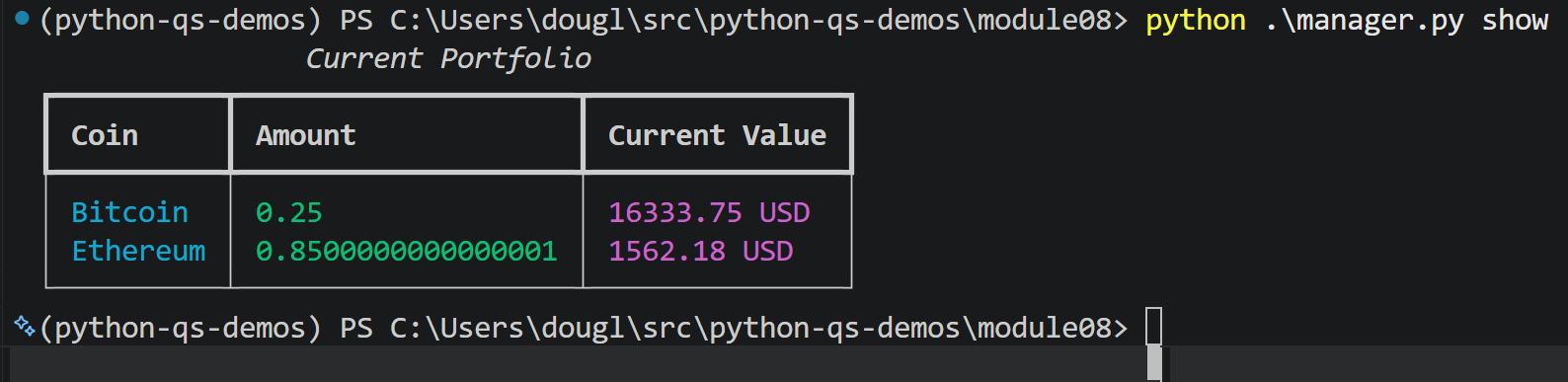
table.add_column("Coin", style="cyan")table.add_column("Amount", style="green")table.add_column("Current Value", style="magenta")At the end of the for loop body, call the add_row method on the table with a value for each column in the table.
table.add_row(coin.capitalize(), f"{amount}", f"{value:.2f} {currency.upper()}")At the end of the show_portfolio function, create a Console instance and use the print method to render the table.
console = Console()console.print(table)Now the command
python manager.py portfolioShows the total values of each coin in the portfolio in an easy to read table.
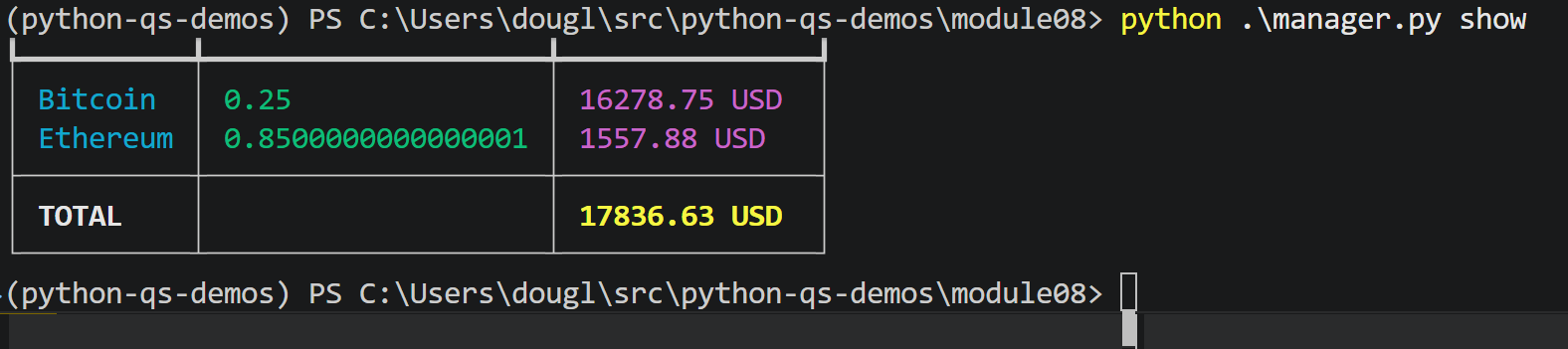
It would also be useful to add a row at the bottom of the table to show the total value of the portfolio. But we don’t want to format it the same as the other rows. Also, we can distinguish it from the other rows by placing it in a new section by calling the add_section method after the for loop.
table.add_section()Now add the row with the add_row method. This row will only have values in the first and third columns so put an empty string in the second column. Override the styles defined earlier in the add_column methods with console markup.
table.add_row( "[bold white]TOTAL[/]", # unused column f"[bold yellow]{total_value:.2f} {currency.upper()}[/]",)To compute the total_value first initialize it to 0.0 before the for loop. Then at the end of the for loop body, add the value of the coin just computed to the total_value variable. The revised show_portfolio function looks like this:
@app.command("portfolio")def show_portfolio(currency: Annotated[str, typer.Option("--currency", "-c")] = "usd"):    coin_amounts = Counter()
    for transaction in CryptoTransaction.select():        if transaction.buy:            coin_amounts[transaction.coin] += transaction.amount        else:            coin_amounts[transaction.coin] -= transaction.amount
    table = Table(title="Current Portfolio")    table.add_column("Coin", style="cyan", no_wrap=True)    table.add_column("Amount", style="green")    table.add_column("Current Value", style="magenta")    price_data = get_current_price(list(coin_amounts.keys()), currency)    total_value = 0.0    for coin in price_data:        price = price_data[coin][currency]        amount = coin_amounts[coin]        value = amount * price        total_value += value        table.add_row(coin.capitalize(), f"{amount}", f"{value:.2f} {currency.upper()}")
    table.add_section()    table.add_row(        "[bold white]TOTAL[/bold white]",        "",        f"[bold yellow]{total_value:.2f} {currency.upper()}[/bold yellow]",    )
    console = Console()    console.print(table)